Interface overview
TexelPack lives in a single panel in the UV Editor's N-panel, under the TexelPack tab. An icon rail on the left switches between seven categories; this page is a map of every control, with a link to the in-depth guide for each feature.
Open the UV Editor, press N and pick the TexelPack tab. Click an icon in the left rail to show that category. Prefer one long scroll? Tick Show All at the top to stack every category in the same panel.
Pack
The heart of the add-on: set up the atlas, pick an algorithm and pack.
- Atlas — Size (px) (square atlas) and Margin (gap between islands).
- Algorithm — quality mode Fast / Balanced / Max Quality; in Balanced you choose the algorithm, in Max Quality you set a Search Time. Plus Allow Rotation (with rotation step and Straighten Islands), Selection Only, Stack Identical Islands (with Similarity Tolerance) and Lock Overlapping Islands.
- Actions — Pack UVs, Preview (dry run), Pack Selected, Detect Overlap, Pin / Unpin Island and Island Margin.
- Advanced Options — Normalize UVs, Uniform Texel Density, Align to Pixel, UDIM Tiles, Group By, Target Tile, Pack Into Region and Excluded Regions.
Full details: Packing & algorithms.
Islands
Transform and select individual islands without a full repack.
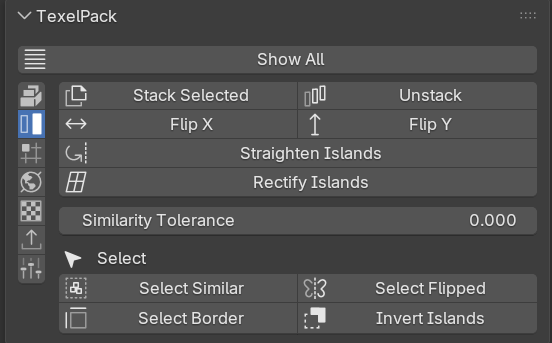
- Stack Selected / Unstack — overlap islands that share a shape, or spread them back into a row.
- Flip X / Flip Y — mirror each island around its own center.
- Straighten Islands — rotate to the minimal bounding box; Rectify Islands — flatten a curved quad-grid island into a straight rectangle.
- Similarity Tolerance — how close shapes must be to count as identical for stacking/selection.
- Select — Select Similar, Select Flipped, Select Border and Invert Islands.
Full details: Island tools.
Layout
Tidy up the relative position of several islands.
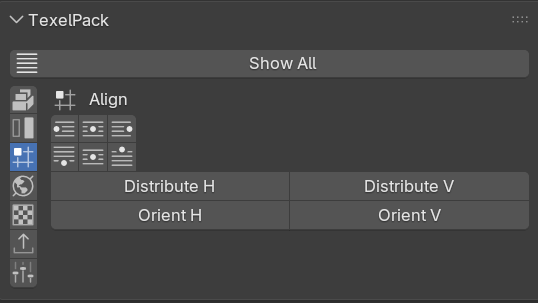
- Align — left / center X / right and bottom / center Y / top, against the selection bounds.
- Distribute H / V — even gaps between three or more islands, keeping the outermost in place.
- Orient H / V — rotate each island so a chosen UV edge becomes horizontal or vertical.
Full details: Island tools.
World
World-aligned UVs for environment and game art.
- Project from World — box / triplanar projection from world space at your target texel density, so the checker stays continuous across the model.
- Orient to World — rotate islands so world up (+Z) points up (+V) in the UV.
Full details: Island tools and Texel density.
Texel Density
Measure, match and inspect texel density and distortion.
- Target Density (px/m) with Get (read the active island) and Set (scale the selection to match).
- View Density Map and View UV Distortion — colored viewport overlays.
- Checker — pick the checker style (UV Grid / Color Grid) and toggle Checker Map; enabling it switches the viewport to show the texture.
Full details: Texel density & overlays.
Export
The result of your last pack, plus layout and data export.
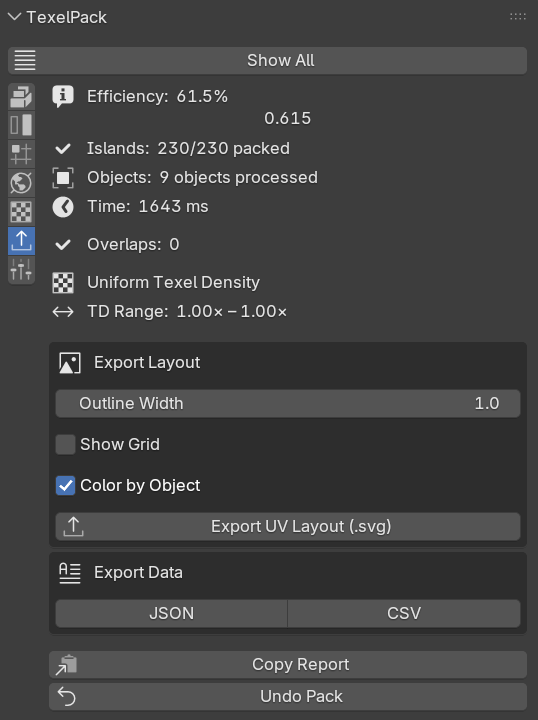
- Last run stats — efficiency, islands packed, objects, time, overlaps, texel-density range and UDIM tiles.
- Export Layout — Outline Width, Show Grid, Color by Object, then Export UV Layout (.svg).
- Export Data — the packing result as JSON or CSV.
- Copy Report (text summary to the clipboard) and Undo Pack.
Full details: Workflow & export.
Presets
Save and reuse your favorite configurations.
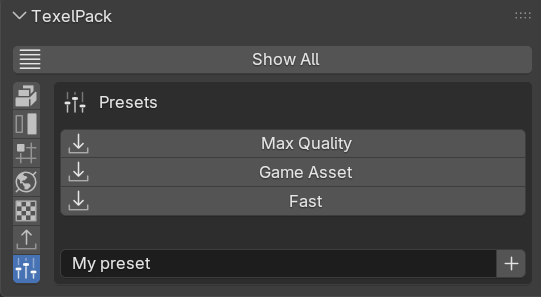
- Built-in presets — Max Quality, Game Asset and Fast load with one click.
- Save / delete — name the current settings and save them; your own presets can be removed (built-ins can't).
Full details: Workflow & export.